
Most agencies using GoHighLevel are running at 30 percent of the platform’s actual capability. They have the CRM set up. They have a pipeline. They send emails manually. And they wonder why they are still spending 15 hours a week on tasks the platform was built to eliminate.
GoHighLevel automation workflows are the difference between an agency that runs on systems and an agency that runs on people. The right workflows respond to leads in seconds, book appointments without human involvement, follow up consistently for weeks, and onboard new clients without a single manual step.
This guide covers the 10 GoHighLevel automation workflows that deliver the highest ROI for agencies in 2026. Each workflow includes the exact trigger, action sequence, and implementation detail you need to build it today.
What Are GoHighLevel Automation Workflows?
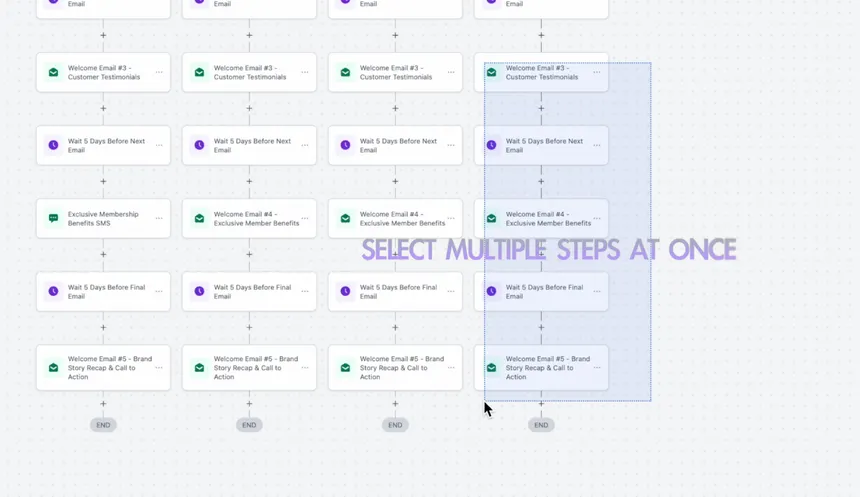
GoHighLevel automation workflows are visual if-then sequences built inside the GHL workflow builder. Every workflow has three components:
Trigger: The event that starts the workflow. Examples include a form submission, a missed call, a pipeline stage change, a tag added to a contact, or an appointment booking.
Actions: What happens after the trigger fires. Actions include sending SMS, sending email, creating tasks, moving pipeline stages, adding tags, updating contact fields, assigning team members, and triggering other workflows.
Conditions and Filters: Logic rules that control which contacts go through which path. Example: if the lead source tag equals “Facebook Ads,” route them to the Facebook nurture sequence. If the tag equals “Google Ads,” route to a different sequence.
Once a GoHighLevel automation workflow is live, it runs 24 hours a day, 7 days a week, without any manual input. Every lead gets the same fast, consistent follow-up regardless of what time they submitted a form, booked a call, or missed a payment.
Responding to a lead within 5 minutes increases conversion rates by 400 percent compared to responding within an hour. GoHighLevel automation workflows make sub-minute response times the standard for every lead your agency handles.
Workflow 1: Missed Call Text-Back
The highest-ROI GoHighLevel automation workflow in the entire platform. When a call goes unanswered, an automated SMS reaches the caller within 60 seconds while they still have their phone in hand and the business top of mind.
Why it matters: Most businesses call back missed calls 2 to 4 hours later. By that point, the prospect has already called your competitor.
Trigger: Call status equals Missed
Actions:
- Wait 1 minute (allows manual callback first without automation firing prematurely)
- Send SMS: “Hey [First Name], sorry we missed your call! We would love to help. Click here to book a time that works for you: [booking link]”
- Create internal notification for assigned team member
- Add tag: “Missed Call”
- If no response in 2 hours: send follow-up SMS with different angle
Exit condition: If callback completed within 60 seconds, stop workflow.
Time saved: 2 to 4 hours per week for agencies managing high inbound call volume.
Workflow 2: Instant Lead Response
Speed is the single biggest conversion lever in lead generation. GoHighLevel automation workflows make instant response the default for every lead, regardless of time or team availability.
Why it matters: Research consistently shows that responding within 5 minutes dramatically increases contact and conversion rates compared to manual follow-up happening hours later.
Trigger: Form submitted (any lead capture form)
Actions:
- Immediately send SMS: “Hey [First Name], thanks for reaching out to [Business Name]. Someone from our team will be in touch shortly. In the meantime, feel free to book a time here: [booking link]”
- Immediately send email: Welcome email with value proposition and next step
- Create opportunity in pipeline at “New Lead” stage
- Assign to team member via round-robin or specific assignment
- Create task for team member: “Call [First Name] within 15 minutes”
- Wait 30 minutes with no response: send follow-up SMS
- Wait 24 hours with no response: send follow-up email with case study
Time saved: 3 to 5 hours per week eliminated from manual lead intake and initial outreach.
GoHighLevel Sales Pipeline Setup for Agencies 2026
Workflow 3: Appointment Confirmation and Reminder Sequence
No-show rates devastate agency productivity. An empty calendar slot is lost revenue that cannot be recovered. This GoHighLevel automation workflow cuts no-show rates from a typical 30 to 40 percent down to under 10 percent.
Why it matters: Every no-show costs an agency not just time but momentum. Automated reminders solve this problem without adding any administrative work.
Trigger: Appointment booked in GHL calendar
Actions:
- Immediately send confirmation SMS with appointment date, time, and meeting link
- Immediately send confirmation email with full details and what to prepare
- Wait until 24 hours before appointment: send reminder SMS
- Wait until 2 hours before appointment: send final reminder with direct meeting link
- At appointment time with no-show detected: wait 10 minutes, then send re-booking SMS
- Create task for team member: “Follow up on no-show within 1 hour”
- Move opportunity to “No Show” pipeline stage
Time saved: 2 to 3 hours per week in manual reminder sending and no-show follow-up.
Workflow 4: Lead Qualification and Routing
Not all leads deserve the same follow-up. This GoHighLevel automation workflow segments incoming leads by quality and routes them to the appropriate sequence, pipeline stage, and team member automatically.
Why it matters: Agencies waste significant time manually reviewing and sorting leads. Automated qualification puts your team’s attention on the highest-value prospects first.
Trigger: Form submitted (qualification form with scoring fields)
Actions:
- Check conditional logic: did the lead select a budget over $1,000? Yes or no.
- Route A (High Intent): Add tag “Hot Lead,” create opportunity in “Priority” pipeline, assign to senior sales rep, send immediate personal-style SMS
- Route B (Low Intent): Add tag “Nurture Lead,” add to long-term drip campaign, assign lower-priority follow-up task
- Both routes: Send confirmation email with appropriate next step
Time saved: 2 to 4 hours per week in manual lead review and sorting.
Workflow 5: Multi-Channel Lead Nurture Sequence
Most leads do not convert on the first contact. This GoHighLevel automation workflow runs a structured multi-channel follow-up sequence across SMS, email, and voicemail over 21 days without any manual work.
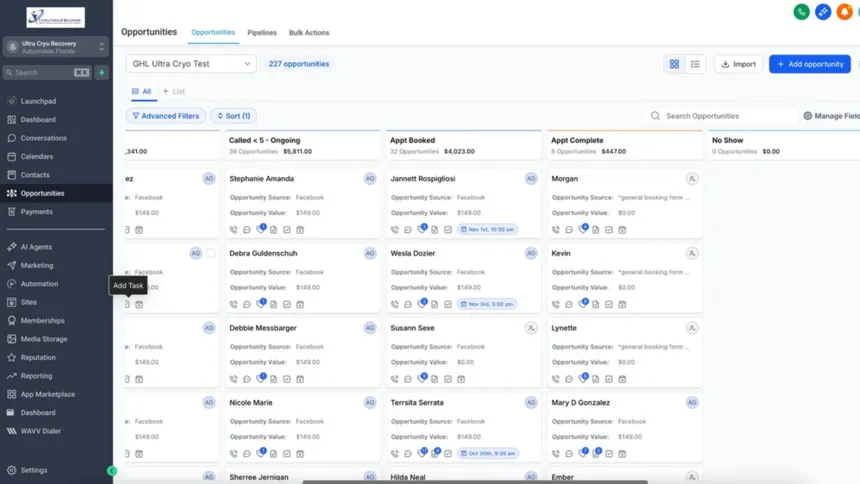
Why it matters: The majority of sales happen after the fifth touchpoint. Most agencies give up after two.
Trigger: Contact tagged as “New Lead” with no appointment booked
Action sequence:
| Day | Channel | Message |
|---|---|---|
| Day 0 | SMS | Intro and booking link |
| Day 0 | Welcome with case study | |
| Day 2 | SMS | Value-add tip related to their pain point |
| Day 3 | Social proof email with client result | |
| Day 5 | SMS | Direct ask: “Are you still looking for help with [X]?” |
| Day 7 | FAQ email addressing common objections | |
| Day 10 | SMS | New angle: different benefit |
| Day 14 | Last-chance style email with urgency | |
| Day 21 | SMS | Re-engagement: “Checking back in” |
Exit condition: Lead books appointment at any point, exits nurture sequence immediately.
Time saved: 5 to 8 hours per week in manual follow-up across a team of 2 to 3 people.
Workflow 6: Client Onboarding Automation
When a new client signs, the first 7 days set the tone for the entire relationship. This GoHighLevel automation workflow delivers a structured, professional onboarding experience without any manual effort from your team.
Why it matters: Clients who feel properly onboarded are significantly less likely to churn in the first 90 days. This workflow protects retention from day one.
Trigger: Opportunity stage changed to “Closed Won” or contract signed
Actions:
- Immediately send welcome email with everything the client needs for week one
- Add tag: “Active Client”
- Send SMS confirmation of kickoff call time
- Day 1: Send onboarding checklist email with access credentials and next steps
- Day 3: Send check-in SMS asking if they have any questions
- Day 7: Send week-one update request asking for initial feedback
- Create project task list for internal team in GHL or connected project tool
- Remove from any active sales sequences
Time saved: 3 to 5 hours per client onboarded. For agencies onboarding 4 clients per month, that is 12 to 20 hours saved monthly.
Make.com GoHighLevel Integration Complete Guide 2026
Workflow 7: Review Request Automation
Online reviews directly impact local search rankings and new client acquisition. This GoHighLevel automation workflow requests reviews at exactly the right moment: right after a positive client interaction.
Why it matters: Agencies that ask for reviews manually get them inconsistently. Automated review requests get them systematically.
Trigger: Appointment status marked as “Showed” or opportunity moved to “Service Delivered” stage
Actions:
- Wait 2 hours after trigger (give the client time to reflect)
- Send SMS: “Hey [First Name], it was great speaking with you today. If you found the session valuable, we would really appreciate a quick Google review: [review link]. It only takes 60 seconds and means a lot to us.”
- Wait 3 days with no review: send follow-up email with same request
- Add tag: “Review Requested”
- If review left: add tag “Review Received,” send thank-you SMS
Time saved: 1 to 2 hours per week in manual review request sending.
Workflow 8: Pipeline Stage Automation
Manual pipeline management is one of the biggest time drains in agency operations. This GoHighLevel automation workflow updates pipeline stages, assigns tasks, and triggers follow-up sequences automatically based on contact actions.
Why it matters: A pipeline that requires manual updates is a pipeline your team will stop using. Automation keeps it accurate without adding work.
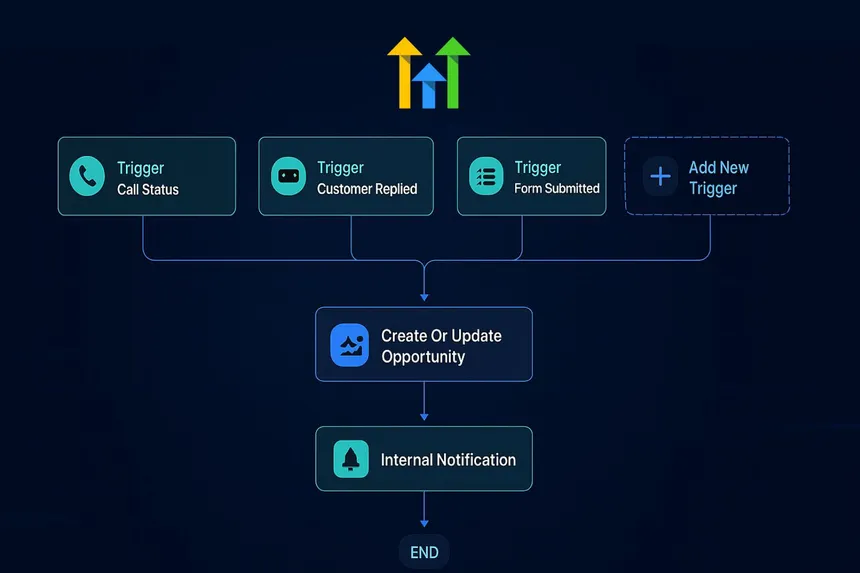
Trigger: Various (form submission, appointment booked, email reply received, tag added)
Key automations to build:
- Form submitted: move opportunity to “Contacted” stage, assign follow-up task
- Appointment booked: move to “Demo Booked” stage, trigger confirmation sequence
- Appointment completed: move to “Proposal Pending” stage, create proposal task
- No response in 7 days: move to “Stalled” stage, alert sales manager
- Contact unsubscribes: move to “Closed Lost,” remove from all active sequences
Time saved: 3 to 5 hours per week across an agency managing 20 or more active opportunities.
Workflow 9: Payment and Invoice Follow-Up
Late payments disrupt agency cash flow. Chasing invoices manually is time-consuming and uncomfortable. This GoHighLevel automation workflow handles payment reminders professionally without any manual effort.
Why it matters: Automated invoice reminders maintain professionalism while removing an uncomfortable manual task from your team’s workload.
Trigger: Invoice sent via GHL payments or Stripe integration
Actions:
- Day 0: Send invoice delivery email with payment link and due date
- Day 3 before due date: Send friendly reminder SMS: “Just a heads up, your invoice of [amount] is due in 3 days.”
- Due date with no payment: Send reminder email with direct payment link
- 3 days overdue: Send firmer email reminder
- 7 days overdue: Create task for account manager to make personal call
- Payment received at any point: Send confirmation email, add tag “Paid,” remove from reminder sequence
Time saved: 1 to 3 hours per week per agency managing 10 or more active client invoices.
Workflow 10: Re-Engagement Campaign for Cold Leads
Every agency has a CRM full of leads that went cold at some point. This GoHighLevel automation workflow systematically re-engages them without manual work.
Why it matters: Cold leads are cheaper to convert than new leads. They already know who you are. They just needed more time or a different trigger.
Trigger: Contact has tag “Cold Lead” or has been in “Closed Lost” stage for 60 days
Actions:
- Day 1: Send re-engagement email: “It has been a while since we spoke. A lot has changed on our end and I wanted to check back in.”
- Day 3: Send SMS with new offer or updated value proposition
- Day 7: Send case study or client result relevant to their industry
- Day 14: Send final email with clear call to action and booking link
- If no response after day 14: tag as “Long Term Nurture,” add to quarterly check-in sequence
- If response at any point: remove from cold sequence, add to active pipeline, notify assigned rep immediately
Time saved: 4 to 6 hours per month in manual re-engagement outreach across a typical agency CRM.
How to Deploy GoHighLevel Automation Workflows Across Multiple Client Accounts
Building these workflows once is valuable. Deploying them across 10, 20, or 50 client sub-accounts efficiently is where agencies build real competitive advantage.
Use GHL Snapshots. A snapshot captures your entire workflow library including triggers, action sequences, and settings. You can deploy a snapshot into a new sub-account in minutes, instantly replicating your proven automation setup for every new client without rebuilding from scratch.
Tag your workflows clearly. Inside each sub-account, name workflows with a consistent naming convention: “01 Missed Call Text-Back,” “02 Instant Lead Response,” and so on. This makes auditing and troubleshooting fast when managing dozens of sub-accounts.
Build a monitoring system. Connect GHL to Make.com and push workflow execution logs to a central Google Sheet or Slack channel. When a workflow fails or fires unexpectedly, you know immediately instead of finding out when a client complains.
Learn more about GoHighLevel Workflows
Common GoHighLevel Automation Workflow Mistakes
Building complex workflows before the basics work. Start with missed call text-back and instant lead response. Get those clean and tested. Then add layers of complexity. A perfect system that is too complicated to maintain is worse than a simple system that actually runs.
No exit conditions. Every workflow needs clear exit conditions. If a lead books an appointment, they need to exit the nurture sequence immediately. Without exit conditions, contacts receive messages that no longer apply, which damages trust and unsubscribe rates.
Skipping the tag system. Tags are how GoHighLevel routes contacts through the right workflows. Without a consistent tagging strategy, contacts accumulate without context and trigger the wrong automations. Build your tag structure before building your first workflow.
Not testing with real data. Test mode uses sample data that rarely matches real contact behavior. Run every workflow with a real test contact before setting it active. Catch broken message links, wrong field mapping, and timing issues before your leads see them.
Automation overlap. Two workflows triggering from the same action means a contact gets double messages. Map every workflow on paper before building and check every trigger against your existing active workflows.
FAQ
Q: What are GoHighLevel automation workflows?
A: GoHighLevel automation workflows are visual if-then sequences that trigger automated actions including SMS, email, pipeline stage updates, and task creation based on contact behaviors or predefined conditions. They run 24/7 without manual intervention once configured and activated.
Q: Do I need coding knowledge to build GHL workflows?
A: No. GoHighLevel’s workflow builder is fully visual with drag-and-drop functionality. If you understand basic if-this-then-that logic, you can build any workflow on this list without writing a single line of code.
Q: How long does it take to set up all 10 workflows?
A: A focused agency operator can build and test all 10 workflows in 2 to 3 days. Building them correctly the first time, with proper exit conditions and tag logic, takes longer than rushing but prevents significant problems at scale.
Q: Can I copy GoHighLevel automation workflows between client accounts?
A: Yes. Use GHL’s Snapshot feature to capture your entire workflow library and deploy it into any new sub-account. This is one of the most powerful features for agencies managing multiple clients on the Unlimited or SaaS Pro plan.
Q: What is the most important GoHighLevel automation workflow to build first?
A: The missed call text-back workflow delivers the fastest and most measurable ROI for most businesses. It requires minimal setup, activates immediately, and directly protects revenue that would otherwise be lost to slow manual follow-up.
Q: How do GoHighLevel automation workflows connect to Make.com?
A: Make.com integrates directly with GoHighLevel via its native module library. You can trigger Make.com scenarios from GHL workflow actions, push GHL contact data to external tools, and pull data from third-party platforms into GHL workflows using webhooks.
Final Thoughts on GoHighLevel Automation Workflows
The agencies that win in 2026 are not the ones with the most features turned on. They are the ones who built clean, tested GoHighLevel automation workflows and deployed them consistently across every client account.
Start with the missed call text-back and instant lead response. Get those working. Then add the appointment reminder sequence and client onboarding workflow. Build one workflow at a time, test it with real data, and activate it only when it is clean.
Ten well-built GoHighLevel automation workflows running across your agency will save more time and protect more revenue than any other single investment you make in your tech stack this year.
Explore more GoHighLevel tutorials, automation guides, and agency systems at makeJUMP Articles, covering everything you need to build an agency that runs on systems instead of people.

Jaber Rayhan has 6+ years of hands-on experience creating marketing systems, sales pipelines, and automation workflows for service businesses in the USA, UK, Europe and the Middle East, as a CRM automation specialist and GoHighLevel expert. He is a CRM Expert and Manager at Sales Compass where he creates and implements end-to-end GHL automation solutions for real clients, such as CRM architecture, funnel design, appointment workflows, and lead qualification systems. He is also the founder of makeJUMP, a digital agency that specializes in CRM automation and GoHighLevel builds. All makeJUMP Articles are based on first-hand experience with implementation, not just research.