
A GoHighLevel sales pipeline is not just a Kanban board. It is the operating view of your agency’s revenue, follow-up timing, and conversion flow. When your GoHighLevel sales pipeline is built correctly, it shows you exactly where every deal stands, what action needs to happen next, and where leads are falling through the cracks.
When it is built poorly, it becomes a cluttered dashboard with stalled opportunities, missed follow-ups, and a system your team quietly avoids using.
This guide covers everything you need to set up a GoHighLevel sales pipeline from scratch in 2026: pipeline architecture, stage design, opportunity creation, automation triggers, and the real workflows that agencies use to manage dozens of active clients and prospects simultaneously.
What Is a GoHighLevel Sales Pipeline?
A GoHighLevel sales pipeline is a visual board inside the Opportunities section of GoHighLevel that organizes every active lead and deal by stage. Each deal is represented as a card. Each card moves through stages that represent your sales process from first contact to closed deal.
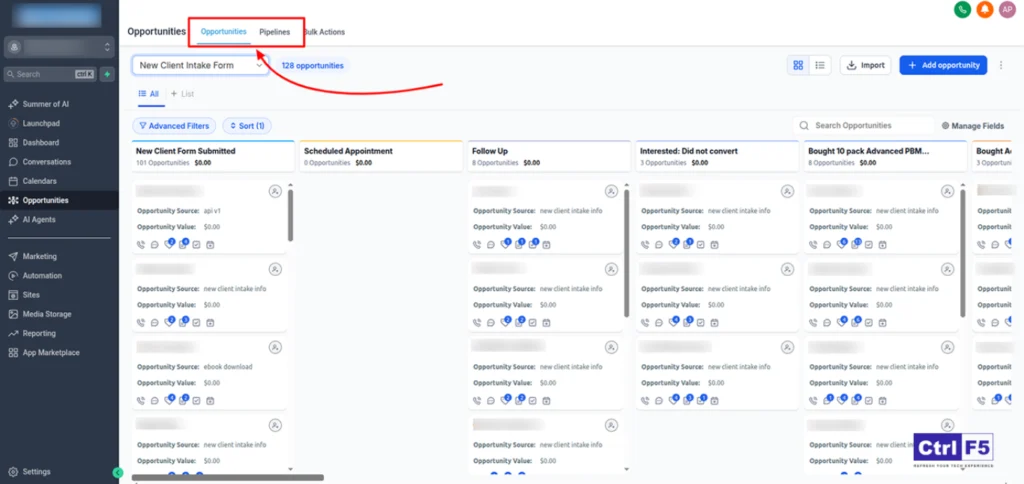
Unlike standalone CRMs like HubSpot or Salesforce, GoHighLevel’s pipeline is connected directly to your funnels, automations, SMS workflows, email sequences, and calendar. When a lead fills out a form on your funnel, they automatically appear in your CRM and get assigned to a pipeline stage. When they book a call, they move to the next stage automatically.
The GoHighLevel sales pipeline rewards clear structure. Agencies that build their pipelines with intention get real-time revenue visibility and automated follow-up that runs without manual work. Agencies that build pipelines without a plan end up with broken workflows and duplicated contacts that nobody trusts.
GoHighLevel Sales Pipeline Documentation
GoHighLevel Sales Pipeline vs Opportunity: Key Terms Explained
Before building, understand the difference between these three terms:
Pipeline: The overall GoHighLevel Sales Pipeline process structure. One pipeline contains multiple stages. You can have multiple pipelines inside one GHL account for different products, services, or client types.
Stage: A step inside the pipeline. Examples include New Lead, Contacted, Demo Booked, Proposal Sent, and Closed Won. Each stage represents where a deal currently sits in your sales process.
Opportunity: A single deal record. One opportunity lives inside one stage at a time. An opportunity card contains the contact name, deal value, assigned team member, expected close date, and pipeline stage.
Understanding GoHighLevel Sales Pipeline structure makes the rest of the setup process significantly clearer.
Step-by-Step: Setting Up a GoHighLevel Sales Pipeline
Step 1: Access Pipeline Settings
Inside your GoHighLevel sub-account, navigate to the left sidebar. Click on “Opportunities.” This opens the pipeline view. At the top right, click the settings icon or “Pipelines” to open pipeline management.
Step 2: Create a New Pipeline
Click “Add Pipeline.” Name it clearly based on its purpose. For an agency managing its own new business, name it “Agency Sales Pipeline.” For a client account, name it after the client’s service type, for example “MedSpa Leads Pipeline” or “Real Estate Buyer Pipeline.”
Naming matters because GHL accounts can contain multiple GoHighLevel Sales Pipeline. Clear names prevent team members from adding opportunities to the wrong pipeline.
Step 3: Add Your Pipeline Stages
Click “Add Stage” to create your first stage. Add each stage in the order a lead moves through your sales process. For each stage, assign a name and optionally set a win probability percentage.
Here is a proven GoHighLevel sales pipeline structure for agencies:
| Stage | Description | Win Probability |
|---|---|---|
| New Lead | Just entered the pipeline, not yet contacted | 5% |
| Contacted | First outreach made, waiting for response | 15% |
| Demo Booked | Call or demo scheduled | 40% |
| Proposal Sent | Proposal delivered, awaiting decision | 60% |
| Negotiation | Active back-and-forth on terms or price | 75% |
| Closed Won | Deal confirmed, onboarding started | 100% |
| Closed Lost | Deal did not close, reason logged | 0% |
Step 4: Configure Stage Colors
GoHighLevel lets you assign colors to pipeline stages. Use colors to create visual priority:
- Grey for early stages (New Lead, Contacted)
- Blue for active stages (Demo Booked, Proposal Sent)
- Orange for at-risk stages (Negotiation, follow-up needed)
- Green for Closed Won
- Red for Closed Lost
Color coding gives your team instant visual clarity when scanning the pipeline board.
Step 5: Set Pipeline Currency and Deal Value
Go to pipeline settings and confirm the currency matches your billing currency. When you create opportunities, you will assign a deal value. GHL aggregates these values by stage to give you a revenue forecast view across your pipeline.
Step 6: Save and Open Your Pipeline
Click Save. Navigate back to Opportunities. Your new pipeline is now active and ready for opportunities to be added.
Best CRM for Marketing Agencies in 2026 (Ranked and Compared)
How to Create Opportunities in Your GoHighLevel Sales Pipeline
An opportunity is a deal record. Every active prospect in your sales process should have an opportunity in your pipeline.
Manual Opportunity Creation
Inside the Opportunities view, click “Add Opportunity” or the plus icon. Fill in:
- Contact: Link to an existing contact or create a new one
- Pipeline: Select which pipeline this opportunity belongs to
- Stage: Select the current stage
- Deal Value: Enter the monetary value of this opportunity
- Close Date: Expected close date for revenue forecasting
- Assigned To: Team member responsible for this deal
Automated Opportunity Creation
The most powerful way to populate your GoHighLevel sales pipeline is through automation. When a lead submits a form, books a call, or triggers a workflow event, GHL can automatically create an opportunity and assign it to the correct pipeline stage.
To set this up, go to Automation, create a new workflow, add a trigger (form submitted, appointment booked, etc.), then add the action “Create Opportunity.” Map the contact’s data to the opportunity fields. Set the pipeline and starting stage. Activate the workflow.
From that point forward, every qualifying lead automatically appears in your pipeline without manual data entry.
GoHighLevel Sales Pipeline Stages: Proven Structures for Different Agency Types
Different agency models need different pipeline architectures. Here are tested structures for the most common agency scenarios.
Digital Marketing Agency Pipeline
For agencies selling retainer services such as SEO, paid ads, or social media management:
- New Lead
- Discovery Call Booked
- Discovery Call Complete
- Proposal Sent
- Contract Sent
- Onboarding
- Active Client
- Churned
Note the addition of “Active Client” and “Churned” stages. This turns your pipeline into a full client lifecycle tracker, not just a new business tool.
GoHighLevel Setup Agency Pipeline
For agencies selling GHL builds, funnel builds, and CRM setup services:
- New Inquiry
- Scoping Call Booked
- Scope Agreed
- Invoice Sent
- Project In Progress
- Review and Revisions
- Delivered and Closed
- Upsell Opportunity
Adding an “Upsell Opportunity” stage captures clients who completed a project and are candidates for retainer or additional work.
Coaching and Consulting Agency Pipeline
For agencies selling coaching programs or consulting packages:
- Lead Captured
- Application Received
- Strategy Call Booked
- Strategy Call Complete
- Offer Made
- Payment Received
- Enrolled
- Completed
This structure tracks the entire buyer journey from initial capture through program completion, enabling lifecycle-based follow-up automation at each stage.
Automating Your GoHighLevel Sales Pipeline
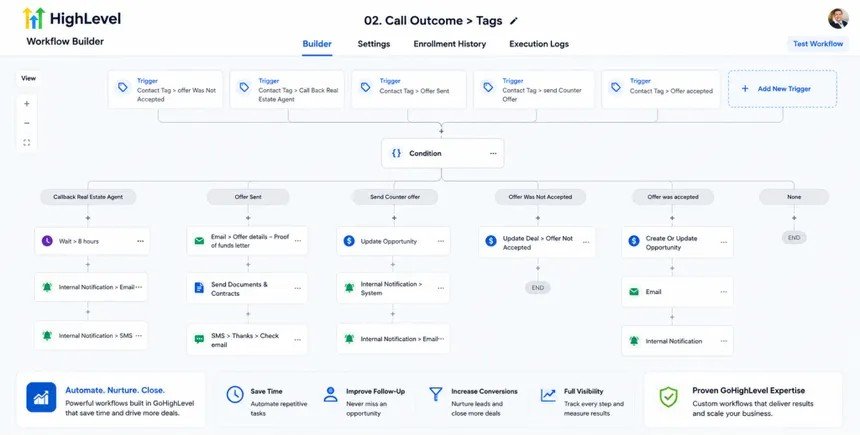
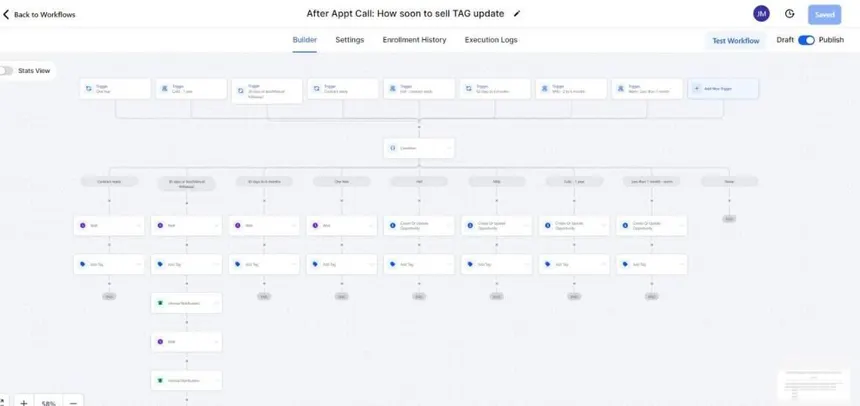
This is where the GoHighLevel sales pipeline becomes genuinely powerful. Automations tied to pipeline stage changes eliminate manual work and ensure consistent follow-up across every deal in your pipeline.
Automation 1: New Lead Instant Follow-Up
Trigger: Opportunity created in “New Lead” stage
Actions:
- Send immediate SMS: “Hey [First Name], thanks for reaching out! I will be in touch shortly.”
- Assign task to sales rep: “Call new lead within 15 minutes”
- Wait 30 minutes
- If no response: send follow-up email with booking link
Result: Every new lead gets immediate contact within minutes. Response rates increase significantly compared to manual follow-up.
Automation 2: Demo Booked Confirmation Sequence
Trigger: Opportunity moves to “Demo Booked” stage
Actions:
- Send confirmation SMS with call details and calendar link
- Send confirmation email with agenda and preparation instructions
- Wait 24 hours before call: send reminder SMS
- Wait 2 hours before call: send final reminder with Zoom link
- After call time: trigger post-call follow-up sequence
Result: No-show rates drop. Prospects arrive to calls prepared. Post-call follow-up happens automatically regardless of whether the sales rep remembers to send it.
Automation 3: Proposal Sent Follow-Up Sequence
Trigger: Opportunity moves to “Proposal Sent” stage
Actions:
- Send proposal delivery email with PDF or link
- Wait 2 days: send check-in SMS (“Did you get a chance to review the proposal?”)
- Wait 2 more days: send value reinforcement email with case study or testimonial
- Wait 3 more days: send urgency follow-up (“I want to hold your spot but have another inquiry coming in”)
- Wait 5 more days with no response: move to “Closed Lost” and trigger nurture sequence
Result: No deal sits in Proposal Sent without structured follow-up. The sequence runs automatically whether your team is available or not.
Automation 4: Closed Lost Re-Engagement
Trigger: Opportunity moves to “Closed Lost” stage
Actions:
- Tag contact as “Lost Lead”
- Remove from active sales sequences
- Add to 90-day re-engagement drip campaign
- At 90 days: send re-engagement email (“Checking back in to see if your needs have changed”)
- Create task for sales rep to make personal outreach at 90-day mark
Result: Lost deals re-enter your pipeline six months later. Agencies report 10 to 15 percent of closed lost deals eventually convert through re-engagement campaigns.
Make.com GoHighLevel Integration Complete Guide 2026
GoHighLevel Pipeline Views: How to Use Them Effectively
GoHighLevel sales pipeline offers multiple views for managing opportunities.
Board View (Kanban)
The default view. Shows all stages as columns with opportunity cards inside each column. Best for daily pipeline management and quickly moving deals between stages by dragging cards.
List View
Shows all opportunities in a sortable table format. Best for bulk actions, filtering by stage or team member, and exporting data.
Revenue View
Shows aggregated deal values per stage. Best for weekly revenue forecasting and identifying which stages hold the most value.
How to use views in your weekly pipeline review:
Start with Revenue View to see your total pipeline value and forecast. Switch to Board View to identify stalled deals that have not moved in 7 or more days. Use List View to filter by assigned team member and check individual performance.
GoHighLevel Pipeline Reporting and Metrics
Tracking the right metrics inside your GoHighLevel sales pipeline tells you where your sales process breaks down and where to focus improvement.
Key metrics to track weekly:
| Metric | What It Tells You |
|---|---|
| Total pipeline value | Total potential revenue in active deals |
| Stage conversion rate | Percentage of deals advancing from each stage |
| Average deal age | How long deals sit in each stage before moving |
| Closed won rate | Percentage of total opportunities that closed |
| Lost reason tracking | Why deals fell out of the pipeline |
GHL’s built-in reporting shows pipeline value by stage and opportunity count per stage. For deeper analysis including conversion rates between stages and time-in-stage tracking, use Make.com to push pipeline data to Google Sheets or a reporting tool.
Common GoHighLevel Sales Pipeline Mistakes
Mistake 1: Too many pipeline stages
More than 8 stages creates friction. Team members stop updating the pipeline because moving cards feels like work. Keep it between 5 and 8 stages maximum. Every stage should represent a real decision point or action, not just a status label.
Mistake 2: No deal values assigned
Opportunities without deal values make revenue forecasting impossible. Make deal value a required field in your opportunity creation workflow. Even a rough estimate is better than leaving it blank.
Mistake 3: Using one pipeline for everything
Running new business, active clients, and upsell opportunities through the same pipeline creates confusion. Create separate pipelines for separate sales motions. GHL supports unlimited pipelines on the Unlimited and SaaS Pro plans.
Mistake 4: No automation on stage changes
A pipeline without automation is just a manual to-do board. Every stage transition should trigger at least one automated action, even if it is just a task notification to the assigned team member.
Mistake 5: Not logging lost reasons
When a deal moves to Closed Lost, require your team to log the reason. GHL supports custom fields on opportunities. Create a “Lost Reason” dropdown with options like Price, Timing, Went with Competitor, No Response, and Budget. This data reveals patterns in why deals fall through and informs how you position future proposals.
FAQ
Q: How many pipelines should an agency have in GoHighLevel?
A: Most agencies operate best with 2 to 4 pipelines. A minimum setup includes one pipeline for new business (agency’s own sales) and one pipeline per client type or service category. Avoid creating a new pipeline for every single client as that creates management complexity without adding value.
Q: Can GoHighLevel automatically move opportunities between pipeline stages?
A: Yes. GHL’s workflow automation can move opportunities between stages based on triggers including form submissions, appointment bookings, tag additions, contact replies, and elapsed time without contact. This is one of the most powerful features of the GoHighLevel sales pipeline.
Q: How do I track multiple clients in one GoHighLevel pipeline?
A: Use tags to segment clients within a shared pipeline, or create separate sub-accounts for each client on the Unlimited plan. Sub-accounts give each client a fully isolated environment with their own pipeline, contacts, and automations. This is the cleanest approach for agencies managing 3 or more clients.
Q: What is the difference between a contact and an opportunity in GoHighLevel?
A: A contact is a person record containing name, email, phone, tags, and communication history. An opportunity is a deal record linked to a contact, representing a specific sales transaction with a value, stage, and close date. One contact can have multiple opportunities (multiple deals or projects over time).
Q: How do I set up pipeline automation in GoHighLevel?
A: Go to Automation, create a new workflow, and select “Opportunity Stage Changed” as your trigger. Specify which pipeline and which stage triggers the automation. Then add your actions: SMS, email, task creation, tag assignment, or any other GHL action. Activate the workflow and it fires automatically every time a deal moves into that stage.
Q: Can I use Make.com with my GoHighLevel sales pipeline?
A: Yes. Make.com integrates directly with GoHighLevel and can trigger scenarios based on pipeline events, push opportunity data to external tools like Google Sheets, Slack, or Airtable, and create or update opportunities from external form submissions and ad platforms.
Final Thoughts on GoHighLevel Sales Pipeline Setup
A well-built GoHighLevel sales pipeline is one of the highest-leverage assets in your agency. It eliminates manual tracking, ensures consistent follow-up, gives you real-time revenue visibility, and makes your entire sales operation easier to manage and scale.
The agencies winning with GoHighLevel in 2026 are not the ones using the most features. They are the ones who built clean pipeline structures, connected them to smart automations, and review their pipeline data every week to find and fix what is not working.
Build your pipeline with intention. Keep the stages simple. Automate every transition. Review your metrics weekly. That is the entire framework.
Explore more GoHighLevel guides and agency automation strategies at makeJUMP Articles covering the systems that actually help agencies scale in 2026.

Jaber Rayhan has 6+ years of hands-on experience creating marketing systems, sales pipelines, and automation workflows for service businesses in the USA, UK, Europe and the Middle East, as a CRM automation specialist and GoHighLevel expert. He is a CRM Expert and Manager at Sales Compass where he creates and implements end-to-end GHL automation solutions for real clients, such as CRM architecture, funnel design, appointment workflows, and lead qualification systems. He is also the founder of makeJUMP, a digital agency that specializes in CRM automation and GoHighLevel builds. All makeJUMP Articles are based on first-hand experience with implementation, not just research.